
SEO Expert: Digital Darts Shopify App

Fix Your Shopify SEO Today
Get the SEO Expert: Digital Darts app from the official Shopify Apps store today. Free plan forever, plus a 14-day free trial of Pro:
Shoppers can’t buy from a store that Google and AI search skip. If your products, collections, and pages are missing meta tags, alt text, and structured data, or quietly rotting with broken links, you’re losing organic traffic and sales every day. SEO Expert is the Shopify SEO app that finds what’s broken and fixes it in bulk. Or skip the clicking and ask Claude or ChatGPT to fix it for you through the MCP connection.
The SEO Challenge With Shopify
Shopify gives you a solid platform, but it leaves the SEO work to you. Meta titles and descriptions must be written page by page. Image alt text is empty on most stores. Rich results like review stars, prices, and breadcrumbs need structured data your theme probably doesn’t output. Most schema apps solve it by injecting code into your theme, which breaks things and leaves a mess when you uninstall.
Meanwhile nothing tells you what’s actually wrong. Broken links pile up as products come and go. Pages you’d never want indexed sit in Google. Your Search Console data lives in a separate tool you rarely open.
Doing all of this by hand across hundreds of products isn’t realistic. That’s why most Shopify stores never get past the basics, and why the stores that do win the search traffic.
Grow with SEO Expert: Digital Darts
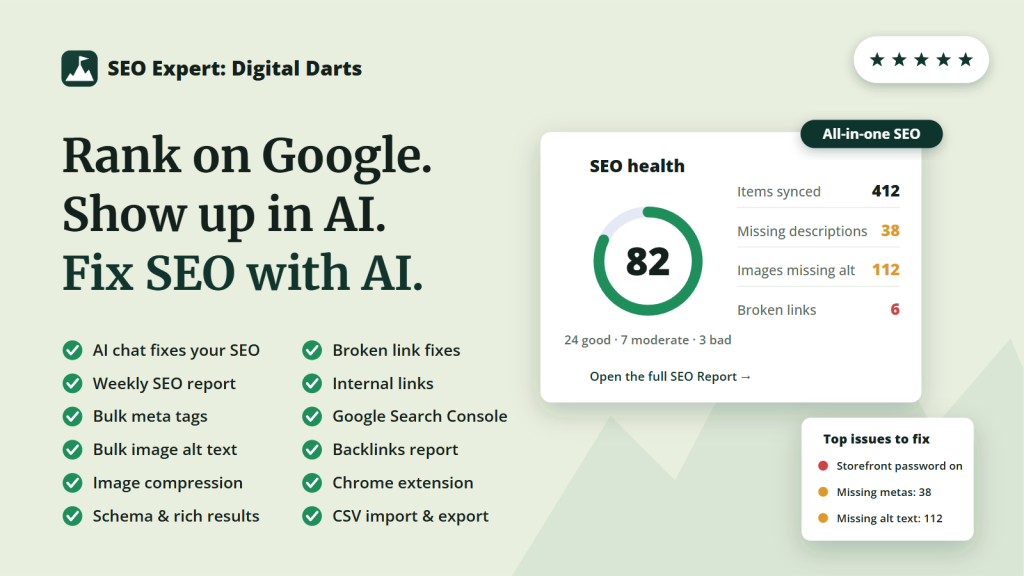
SEO Expert scans every product, collection, page, and blog post, scores your store out of 100, and ranks exactly what to fix first. Then it fixes at scale.
Templates write meta titles and descriptions for hundreds of pages in bulk. Alt text fills in bulk. Structured data adds stars, prices, and breadcrumbs to your results in Google and AI answers through a single app embed. Your theme code is never touched. Broken links found in your content get one-click redirects.
On Pro, the AI chat connector plugs the app into Claude, ChatGPT, or your favourite MCP, so you fix meta tags and alt text by chat with skills built on 10 years of Shopify SEO. You approve every change. On every plan, Shopify Sidekick answers SEO questions about your store.
Google Search Console is built in on every plan: clicks, rankings, top queries, sitemap submission, and index checks, all inside Shopify. You’ll know what’s working and what to do next without leaving your admin.
Highlights
- Designed by 11-year Shopify SEO experts. A weekly audit scans every product, collection, page, and blog post, scores your store out of 100, and ranks the issues by impact so you always know what to fix first.
- Bulk meta tag templates write titles and descriptions for hundreds of pages at once, with variables, a live Google preview, and CSV import/export. Pro auto-applies templates to new products as you add them.
- Image alt text in bulk. Fill every missing alt attribute across your catalog from a template. Good for SEO, accessibility, and image search.
- Rich results in Google and AI answers. JSON-LD structured data adds review stars, prices, and breadcrumbs to your listings, the machine-readable layer AI search reads. One app embed, zero theme edits: disable the embed and your theme is 100% clean.
- Broken link checker scans your content for dead links and fixes them with one-click redirects. No more silent 404s bleeding link equity.
- Ask AI to fix your SEO. Claude and ChatGPT connect through the Shopify SEO MCP server, with skills built on 10 years of Shopify SEO. You approve every change. Shopify Sidekick answers SEO questions on every plan.
- Free Shopify SEO Chrome Extension checks any page as you browse. See titles, headings, alt text, structured data, and Core Web Vitals in plain English. Connect your store and its open audit issues appear on the exact page you’re viewing.
- Google Search Console built in, free on every plan. Clicks, rankings, top queries, sitemap submission, and index status inside Shopify. No competitor gives this away.
- Backlinks report shows the domains linking to your store, with new and lost links refreshed monthly on Pro.
- Trusted long-time standing. From the makers of the Digital Darts: Related Posts app, published and supported since 2015, and the Digital Darts: Hreflang Tags app.
- Free plan forever. The free tier is genuinely useful: weekly reports, unlimited single edits, bulk alt text, schema, and Search Console. You’re never locked out. Contact us for support.
Frequently Asked Questions
Install the app through the Shopify marketplace. A setup checklist walks you through the essentials: your first SEO scan runs automatically, and one click enables the app embed that powers structured data. Most stores are fully set up in a few minutes.
The free plan is genuinely useful, forever: a weekly SEO report with your health score, unlimited single meta and alt text edits, bulk meta templates for 50 items a month, unlimited bulk image alt text, product, breadcrumb, and brand structured data, a monthly broken link scan, full Google Search Console integration, and Shopify Sidekick answering SEO questions.
Pro is $39/month or $374/year with a 14-day free trial. It adds the AI chat connector for Claude, ChatGPT, and your favourite MCP, unlimited bulk applies, auto-applied templates on new products, auto-redirects for deleted products, weekly link scans with full results, daily rescans, and priority support. You’re never locked out of the app on the free plan.
No. Everything storefront-side runs through a single app embed you toggle on in the theme editor. The app never writes to your theme files, so there are no leftover code snippets. Disable the embed or uninstall and your theme is 100% clean. Meta tags and alt text are saved to your products and pages through Shopify’s own APIs, exactly as if you’d typed them into the admin yourself, so they stay even if you uninstall.
AI answers and search features read the same machine-readable layer Google does: structured data, meta tags, alt text, and your sitemap. The app builds and maintains that layer: product schema with prices and availability, review stars from supported review apps, breadcrumbs, and clean meta tags. Both Google and AI-powered search can then understand and cite your store. No gimmicks, just the data these systems actually consume.
On Pro you can go further: connect Claude or ChatGPT through the MCP connector and ask AI to make the fixes for you. You approve every change.
Yes, on the Pro plan. The app runs an MCP server, the standard way an AI assistant connects to a real system, so Claude and ChatGPT can read your store’s SEO and fix it for you instead of handing you generic advice.
Tell it you’ve just added 40 products and to sort out their SEO, or ask why your traffic dropped last month, and it works through your audit issues, meta tags, alt text, broken links and Google Search Console data to answer and act. There are 26 tools in total. Every change is recorded in the app’s activity log.
Setup takes a couple of minutes and there’s no API key to manage. See the full steps and the complete tool list on our Shopify MCP server page.
Uninstall it from your Shopify admin like any app. That stops billing immediately. To turn off structured data first, disable the app embed in Online Store > Themes > Customize > App Embeds. Because the app never touches your theme code, nothing is left behind. Meta tags and alt text you applied remain on your store, since they’re saved to your own products and pages.
I Need Further Help
To go deeper on Shopify SEO, read my ultimate Shopify SEO guide. Install the free Chrome extension and it will show your store’s audit findings on the page you’re looking at.
For help with the app, please reach out to our support by filling in the support form. Share any questions or issues.
Fix Your Shopify SEO Today
Get the SEO Expert: Digital Darts app from the official Shopify Apps store today:
