
Shopify SEO Chrome Extension
See what’s hurting your Shopify store’s SEO and speed while you browse it, with our free Shopify SEO Expert Chrome Extension. Check titles, meta descriptions, headings, canonicals, structured data, alt text, internal links, and Core Web Vitals on any live page, with problems highlighted on the page itself.
Want the fixes done for you? Connect the free SEO Expert: Digital Darts Shopify app and your store’s full audit follows you from page to page.
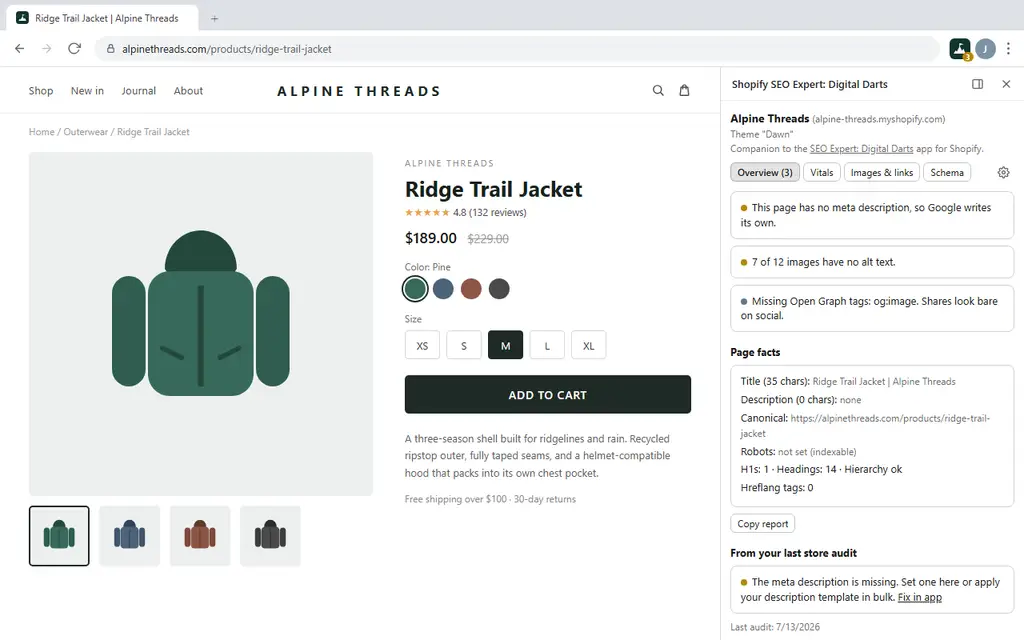
Check Your Store’s SEO In One Click
Rank higher and load faster. Install it for free today from the official Chrome Web Store.
Run a Shopify Store? Fix Every Issue From One App
“SEO Expert: Digital Darts” audits your whole store, then fixes it in bulk: meta title and description templates, image alt text, image compression, JSON-LD, broken links and redirects, plus Google Search Console performance and indexing. Free to install, and it powers the findings you see in the extension.
FAQ
Yes. The extension is completely free and sells nothing inside itself. Every page check, overlay, and Core Web Vitals reading works without an account.
The optional SEO Expert: Digital Darts Shopify app is also free to install, with a Pro plan billed by Shopify if you want bulk editing, image compression, and scheduled audits.
No. Click the toolbar icon on any page and the extension checks it straight away, with no app, no login, and no connection.
Connecting the app adds a layer on top: the page you’re viewing shows the open issues from your store’s full audit, each with a link to the exact screen that fixes it, and the toolbar badge keeps a running count as you browse. It also means findings that need Shopify data, rather than what’s visible in the page HTML, show up too.
Install the SEO Expert: Digital Darts app, open Settings and go to the Integrations tab, then choose “Generate pairing code”. You get a one-time code that expires in ten minutes.
Open the extension’s Connect tab, paste the code, and name the device so you can recognise it later. Chrome then asks for access to that store’s domain, which is the only site access the extension ever requests.
You can pair as many stores as you like. Agencies typically connect every client store once, and the extension automatically shows the right store’s findings on the right site.
On-page: title tag presence and length, meta description presence and length, missing or duplicate H1, skipped heading levels, canonical tag missing or pointing elsewhere, noindex robots tags, Open Graph and Twitter card gaps, and hreflang sets with no x-default.
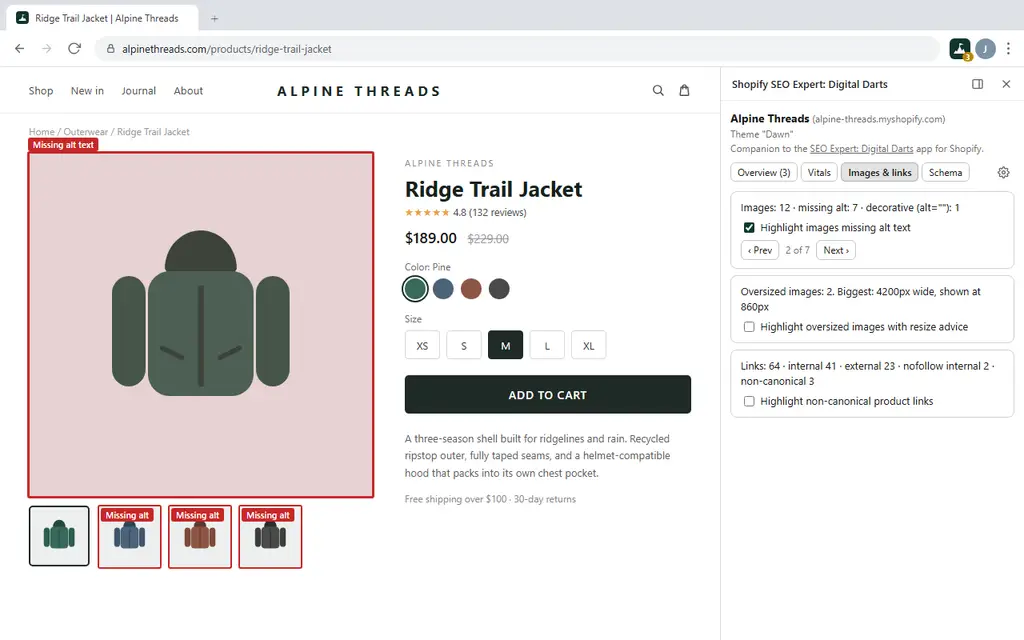
Images: how many images have no alt attribute, how many are marked decorative with alt="", and which are served far larger than they’re displayed, with the width they should be.
Links: internal versus external counts, internal links marked nofollow that block your own link equity, and internal product links using the /collections/.../products/... form instead of the canonical /products/ URL.
Structured data: every JSON-LD block, its schema types, and any block that fails to parse.
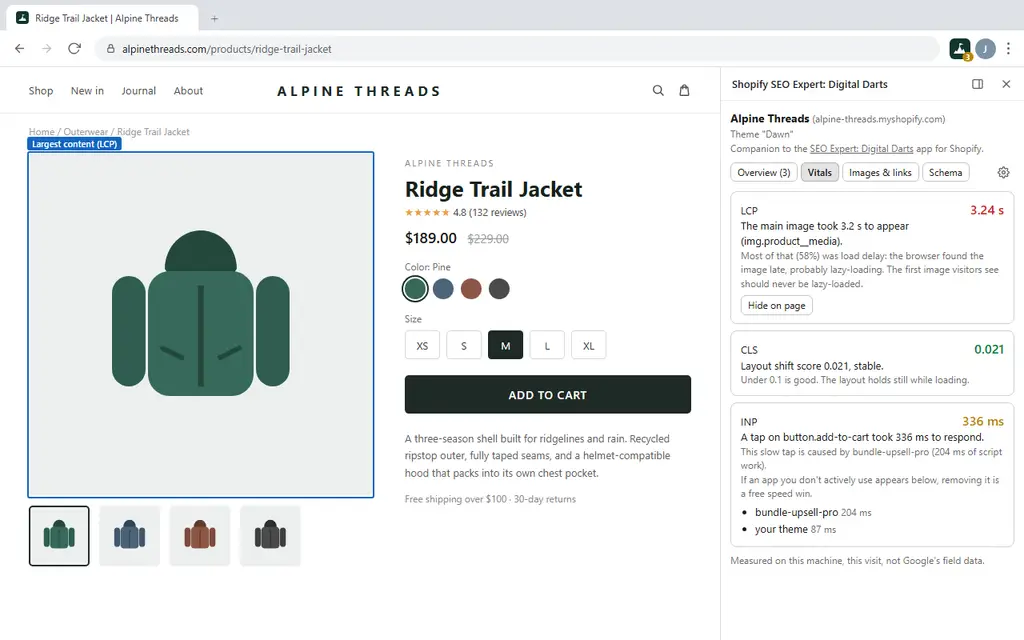
Speed: Largest Contentful Paint, Cumulative Layout Shift, and Interaction to Next Paint, measured live with the cause explained.
There’s also a “Copy report” button that puts the whole page check on your clipboard for a client email or a ticket.
Because they measure different things, and both are useful.
The extension measures what happened on your machine, on this visit, over your connection. PageSpeed Insights reports either a simulated lab test or Google’s field data, which is a 28-day rolling average of real Chrome users on your site.
Use the extension to diagnose: it can name the element that was slow and the app whose script blocked the tap, because it watched it happen. Use field data to judge whether the fix moved the needle for real visitors, which takes a few weeks to show.
If a reading looks partial, reload the page. Core Web Vitals are recorded from the very first paint, so a check run on a page that was already open only sees part of the story.
It means the file the browser downloaded is much wider than the space it’s shown in. A 4000px product photo displayed in a 600px column still costs the full download, and on mobile that’s the difference between a store that feels instant and one shoppers abandon.
Switch on the oversized overlay and each offender is outlined on the page with the width it should be. Resize and re-upload, or let the Shopify app’s image compression do it in bulk.
Alt text works the same way: the overlay highlights every image with no alt attribute. Images with alt="" are treated as intentionally decorative and left alone, which is correct.
The on-page checks, image and link overlays, structured data reading, and Core Web Vitals work on any website you open them on. The advice is written for Shopify merchants, and a few checks are Shopify-aware, such as detecting the theme, attributing slow scripts to Shopify apps, and flagging collection-scoped product URLs.
Connecting a store, and the audit findings that come with it, requires the Shopify app.
Chrome blocks extensions from running on its own pages, such as chrome://extensions, the New Tab page, the Chrome Web Store, and PDF viewers. There’s no way around that, and the extension tells you plainly rather than showing an empty result.
On a normal page, if a check doesn’t run, Chrome is asking for site access. Click the icon again and approve it. Access is granted per site and you can revoke it any time from chrome://extensions.
Page checks run entirely in your browser. On a store you haven’t connected, the extension makes no requests to us at all.
On a store you have connected, it sends that store’s page URL to our API so we can return that page’s audit findings, along with the pairing token that identifies the store. Nothing else about your browsing is observed, stored, or transmitted, no data is ever sold, and there’s no advertising or analytics tracking in the extension.
Full details are in our privacy policy.
That’s Chrome’s standard wording for any extension that can see the address of the tab you’re viewing, and extensions can’t change how Chrome phrases it. You’ll see the same warning on virtually every SEO tool in the Web Store.
We use that permission for one thing: reading the URL of the page you’re currently on, so the side panel knows which page to check and which connected store it belongs to. The extension never opens your browser history, doesn’t track the sites you visit, and sends nothing anywhere except the page URL of a store you’ve chosen to connect, as described in “What data does it collect?” above.
Start with our guide to Shopify SEO, which covers the same ground the extension checks, in the order worth fixing it.
The fastest way to clear a long list of issues is the SEO Expert: Digital Darts app. It audits the whole store, then fixes meta tags, alt text, image weight, structured data, and broken links in bulk.
If you’d rather it was all handled for you, we run a complete SEO service where we optimize everything about your store’s SEO.
Check Your Store’s SEO In One Click
Rank higher and load faster. Install it for free today from the official Chrome Web Store.