
Hreflang Checker Chrome Extension
Rapidly check the hreflang tags on webpages for SEO with our free Hreflang Checker Chrome Extension. Validate return links, language and region codes, canonical URLs, duplicates, and x-default coverage, and detect geo-IP redirects.
Running Shopify? Use our Hreflang Tags: Digital Darts Shopify app to fix what the checker finds.
Use The Hreflang Checker Chrome Extension Today
Boost your international SEO. Install it for free today from the official Chrome Web Store.
Run a Shopify Store? Fix All Errors Automatically
The “Hreflang Tags: Digital Darts” gives you perfect hreflang tags for your Shopify stores. It generates valid hreflang tags with correct return links and x-default across all your Shopify stores and markets, then keeps them updated automatically.
FAQ
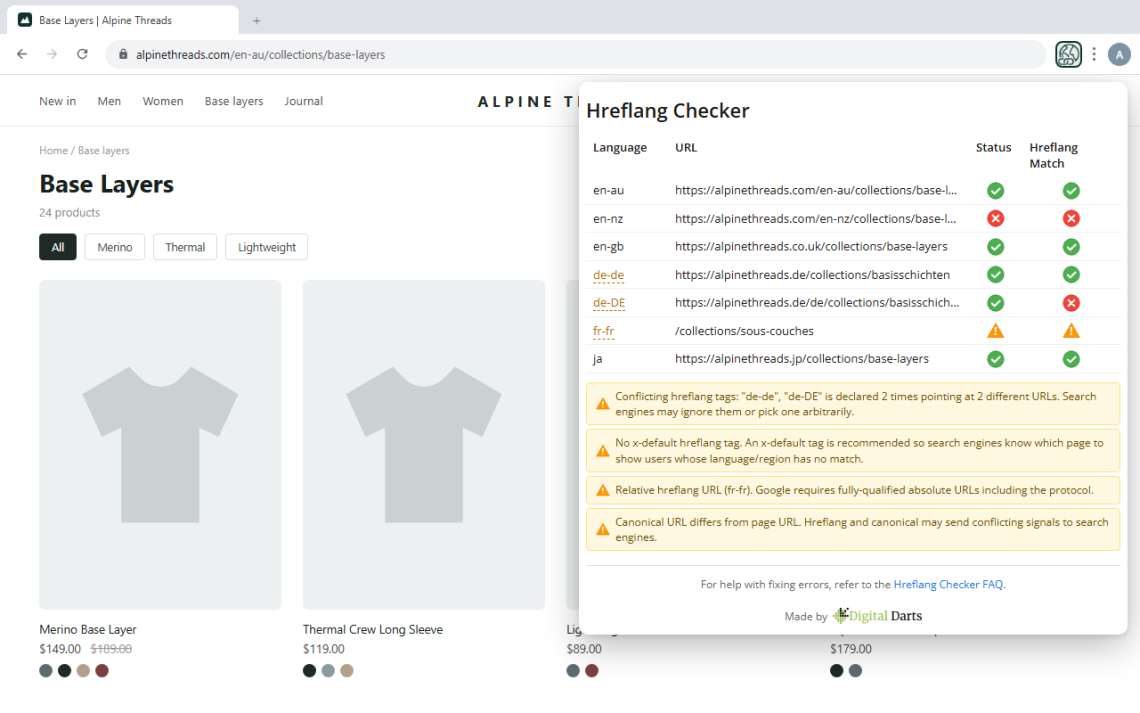
An invalid status means the URL reported does not contain the hreflang tag of the URL you are checking. The errors occur when pages are not self-referential. If product A has a tag pointing to product B, product B must have a tag pointing to product A.
Let’s say the URL you’re inspecting is https://www.store.com/. It has a hreflang tag of https://www.store.com.au/. An invalid status means the .com.au version of the page does not contain the .com hreflang tag.
Note: The extension automatically handles minor URL differences like trailing slashes, http vs https, www vs non-www, and query strings. So if you’re seeing an invalid status, the return link is genuinely missing from the target page.
On Shopify? Our Hreflang Tags: Digital Darts app builds self-referencing tags and matching return links across every store and market for you, so invalid statuses don’t come back.

An invalid language and region match means the URL reported does not contain the same language and region of the URL you are checking. The return link has a different language and region code to the reference.
Let’s say the URL you’re inspecting is https://www.store.com/. It has a language and region of en-us. The URL has a hreflang tag of https://www.store.com.au/. An invalid status means the .com.au version of the page does not contain the en-us language and region for the .com hreflang tag.
The primary language code must match for validation to pass. For example, en-us and en-gb will both pass because they share the en primary language. However, en-us and fr-us will not match even though they share the us region.
If the status is invalid, the language and region will always be invalid.
If a page has no html lang attribute at all, the extension shows a “cannot verify” warning instead of marking every row invalid, and warns you that the attribute is missing.
For Shopify, the Hreflang Tags: Digital Darts app writes the correct language and region codes straight from your Shopify Markets setup, so the codes on every page always match.
A duplicate means the exact same language and region value appears in more than one hreflang tag on the page. A conflict is worse: the same language and region points at two different URLs, so search engines have to pick one, and they pick arbitrarily.
Both usually come from stacked SEO apps or themes each injecting their own hreflang tags. Find the two sources and keep only one. Each language-region value should appear exactly once per page, pointing at exactly one URL.
On Shopify, the Hreflang Tags: Digital Darts app generates one clean set of tags per page and its health check flags duplicate language-region values across your stores and markets before search engines ever see them.
A warning icon (orange triangle) means the extension couldn’t fully verify the hreflang tag, but it’s not necessarily wrong. This typically happens for one of three reasons:
Geo-IP redirect: The target server redirected the extension to a different locale based on its IP address. For example, visiting https://www.store.com/ might redirect to https://www.store.com/en-au/. Your browser may not experience this redirect (due to cookies or session), but the extension’s validation request does. If the page it lands on still contains a valid return link, the extension marks the tag valid; you only get a warning when it can’t confirm the return link after the redirect.
Request timeout: The target page took longer than 15 seconds to respond. This can happen with slow servers or during high traffic.
Other redirects: The page redirected to a different URL that isn’t a simple protocol or www change. Hover over the warning icon to see exactly where it was redirected.
In all cases, hover over the warning icon for a detailed explanation of what happened.
Google requires that every page with hreflang tags includes a tag pointing to itself. This is called a self-referencing hreflang tag.
For example, if you’re on https://www.store.com/ and it has hreflang tags pointing to https://www.store.com.au/ and https://www.store.co.uk/, it must also include a hreflang tag pointing to https://www.store.com/ itself.
If this tag is missing, search engines may not process your hreflang tags correctly. Most CMS platforms and hreflang apps add this automatically, but it’s worth checking.
On Shopify? Our Hreflang Tags: Digital Darts app adds the self-referencing tag to every page automatically, alongside the return links for all your other stores and markets.
Hreflang link tags belong in the page’s <head>. If something invalid appears in the head first, like a stray <div> from a theme or an app-injected widget, browsers close the head early and everything after it, including your hreflang tags, gets parsed into the body. Some search engines may not apply tags found there.
The extension detects this and names the element that most likely closed the head early, so you know exactly what to look for in your template. Fix or move the offending element and the hreflang tags will sit in the head where they belong.
This warning appears when a page has hreflang tags but its canonical URL points to a different page. This sends conflicting signals to search engines — the hreflang tags say “here are my alternate language versions” while the canonical tag says “the real version of this page is somewhere else.”
For example, if you’re on https://www.store.com/products/shoes but the canonical tag points to https://www.store.com/collections/shoes, search engines won’t know which signal to trust.
To fix this, make sure the canonical URL matches the page URL, or move the hreflang tags to the canonical version of the page.
Hreflang tags must use valid ISO 639-1 two-letter language codes, optionally followed by a valid ISO 3166-1 region code. The extension checks both parts and flags any that aren’t recognised.
Common mistakes include three-letter language codes and country names used as regions. The extension suggests the correct code when it detects a common mistake: eng should be en, fra should be fr, and en-UK should be en-GB.
Script subtags are supported too, so codes like zh-Hans and zh-Hant-TW validate correctly.
The special value x-default is always valid. It tells search engines which page to show when no other language matches, and the extension warns you when a page’s hreflang set has no x-default coverage.
The extension visits the URLs in the hreflang tags in order to validate the code. To keep this polite, it checks each unique URL only once, even when dozens of regional tags point at the same page, and it never runs more than five checks at a time. Combined with built-in retry logic and increasing delays between attempts, rate limits are rare.
Some websites or platforms like Shopify still throttle the number of requests a single IP address can make in a period of time. If your website says there have been too many requests, you can wait a few minutes and try again. A workaround is to use a VPN to change your IP address. Another option is to ask your webhost to increase the possible requests for your IP address.
The Hreflang Checker only looks at hreflang tags. For everything else on the page, install our Shopify SEO Expert Chrome extension. It analyses whatever page you are on with no crawl to schedule, flagging missing titles, meta descriptions, headings, canonicals and structured data. It highlights alt text gaps, oversized images and link problems directly on the page, and translates Core Web Vitals into plain language so you know which element is actually slowing things down. It is built for Shopify stores and connects to our free Shopify app for one-click fixes.
The Hreflang Checker only looks at hreflang tags. For everything else on the page, install our Shopify SEO Expert: Digital Darts Chrome extension. It analyses whatever page you are on with no crawl to schedule, flagging missing titles, meta descriptions, headings, canonicals and structured data.
It highlights alt text gaps, oversized images and link problems directly on the page, and translates Core Web Vitals into plain language so you know which element is actually slowing things down. It is built for Shopify stores and connects to our free Shopify app for one-click fixes.
Refer to our guide on achieving flawless hreflang tags in Shopify. Even if you’re not on Shopify, the structure of hreflang tags and any reported errors remain the same. Hreflang tags are one of the hardest technical topics of SEO to get right so don’t be discouraged.
If your store runs on Shopify, the fastest fix is our Hreflang Tags: Digital Darts app. It creates and maintains valid hreflang tags across multiple stores, domains, and markets.
If you want us to take it all off your plate, we can get it done for you. We have a complete SEO service where we optimize everything about your SEO, including hreflang tags.
Use The Hreflang Checker Chrome Extension Today
Boost your international SEO. Install it for free today from the official Chrome Web Store.